Showing posts with label RaspberryPi. Show all posts

Monday, April 4, 2022

How to interface SPI TFT LCD(ST7735) with RaspberryPi- Part 2


In this Part2 of interfacing LCD with Raspberry Pi, we are going to use low level drivers/Frame buffers to interface LCD with RPI over SPI interface and hence giving ability to play videos and show console out on the LCD

Please checkout below Part -1 on How to interface LCD with Raspberry PI https://youtu.be/SYdGNpfLxKw Download the dts from link below

http://usheethe.com/3M6v

To add console output to the LCD run the commands below sudo nano /boot/cmdline.txt
At the end of the line enter below text: fbcon=map:10 fbcon=font:VGA8x8
Then save the file. To stream a rtsp stream to lcd, execute the command below ffmpeg -i rtsp://wowzaec2demo.streamlock.net/vod/mp4:BigBuckBunny_115k.mp4 -vf scale=200:-1 -pix_fmt rgb565 -f fbdev /dev/fb1 Execute the command below and you will have the desktop on the lcd FRAMEBUFFER=/dev/fb1 startx This video was created upon request from one of the subscribers. Music: Verve Musician: A-GROUP

Monday, January 31, 2022

How to interface SPI TFT LCD(ST7735) with RaspberryPi - Part 1


This video demonstrates how to interface SPI TFT LCD(ST7735) with RaspberryPi

We are using GPIO python libraries to toggle gpio's and interface with SPI.

Download the source code from link below http://fumacrom.com/3d4Nd Note: This tutorial was tested on 32bit Raspberry Pi OS and may not work on 64 bit version.

Saturday, December 25, 2021

How to Toggle RaspberryPi GPIO/LED from Web


 This video demonstrates how to Toggle RaspberryPi GPIO from Web Browser.

We use WebIOPi library to achieve this. steps by step to install WebIOPi Usage wget https://github.com/Freenove/WebIOPi/archive/master.zip -O WebIOPi.zip unzip WebIOPi.zip cd WebIOPi-master/WebIOPi-0.7.1 patch -p1 -i webiopi-pi2bplus.patch sudo ./setup.sh Start WebIOPi sudo webiopi -d -c /etc/webiopi/config For more details visit http://webiopi.trouch.com/ Tutorials on digital pin control http://webiopi.trouch.com/DIGITAL.html Tutorials on Analog interface http://webiopi.trouch.com/ANALOG.html Tutorials on interfacing sensors http://webiopi.trouch.com/SENSOR.html visit below for more https://WorldoMo.blogspot.com

Tuesday, December 21, 2021

How to setup/Install Windows 10/11 on Raspberry Pi


This video demonstrates how to setup/install Windows 10/11 on Raspberry Pi 3 or above Website to visit to download the necessary tools Windows 10/11 iso creator UUDUMP: http://fumacrom.com/3Hnpl ISO flashing tool WOR: http://fumacrom.com/3HnrH

Monday, December 20, 2021

How to remote desktop to Raspberry Pi from Windows


This video demonstrates how to configure and install remote desktop on Raspberry Pi and connect to Raspberry Pi from Windows using XRD Install XRDP by executing commands below sudo apt update sudo apt install xrdp

Sunday, August 8, 2021

Raspberry Pi Video Streaming Server


This video explains how to setup Raspberry Pi as Video streaming server using simple configuration and OBS studio

Steps to follow

sudo apt update
sudo apt upgrade

install Nginx web server:

sudo apt install nginx

Install RTMP module so Nginx can handle media stream:

sudo add-apt-repository universe
sudo apt install libnginx-mod-rtmp

Modify Nginx’s configuration so that it can support media stream.

sudo nano /etc/nginx/nginx.conf

Add the following code to the bottom of the config file:

rtmp {
        server {
                listen 1935;
                chunk_size 4096;

                application live {
                        live on;
                        record off;
                }
        }
}

Save the config file as shown in the video

Restart Nginx with this new configuration:

sudo systemctl restart nginx

Music: Paradise
Musician: @iksonmusic

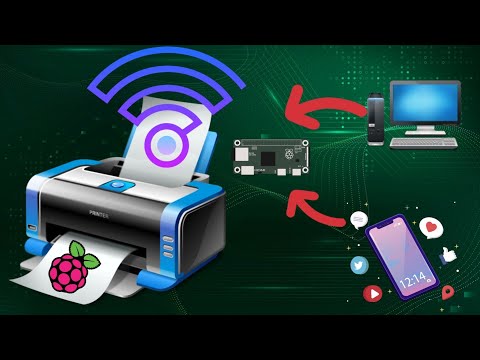
How to add Wireless capability to legacy printers using Raspberry Pi

  This video tutorial demonstrates how to easily add wireless print capablity to your wired legacy printers using your Raspberry Pi. We hav...