You might have noticed that right click doesn’t work while browsing albums of your friends or someone else..
And you end up using the Print Screen method to get those images, get copied into paint and then saving them..
But there is alternative for this and its simple and you will get the actual image uploaded by the user..
First open the image you want to save, just follow these 4 easy steps to save that image.
a)Left click on the image you want to save and keep it pressed.
b)Now slowly drag the cursor(holding on to the left click of mouse button) to a new tab of your browser
c)In the new tab you will see that image you where holding your left click on is transfered.
d)Now simply right click on that image and save the image..
ENJOY!!!!!
Sunday, June 28, 2009

Friday, May 15, 2009
FREE ANTIVIRUS
I have tested many antivirus software's but out of all those i choose and recommend AVIRA ANTIVIRUS..
I consider avira as best antivirus
1> It has very fast virus detection capability
2> Consumes less amount of system memory ~23 MB
3> Very Good heuristics ,that is its capable of detecting unknown virus's and malware's
4> Doesn't slow down or reduce system performance
&
5> BEST THING ABOUT IT IS --- ITS FREE!!!!
Only Thing Free Version Of Avira lacks is it is not equipped with SPYWARE DETECTION Engine.. so if you need to have even Spyware detection ability you need to buy premium version of avira.
But for spyware detection you can use SPYWARE TERMINATOR
Even spyware terminator is Available for free along with free Antivirus(WinClamAV),WebGuard Embedded Into crawler ToolBar.
Currently I'am testing COMODO Security products which is also available For FREE Download
All the links will be posted below..
TO Download FREE AVIRA ANTIVIRUS
VISIT
http://download.cnet.com/Avira-AntiVir-Personal-Free-Antivirus/3000-2239_4-10322935.html?part=dl-10322935&subj=dl&tag=button&cdlPid=11012914
To Download SPYWARE TERMINATOR For Free
Visit
http://www.spywareterminator.com/download/download.aspx
To DOWNLOAD FREE COMODO SECURITY PRODUCTS
VISIT
http://www.comodo.com/products/free_products.html
I consider avira as best antivirus
1> It has very fast virus detection capability
2> Consumes less amount of system memory ~23 MB
3> Very Good heuristics ,that is its capable of detecting unknown virus's and malware's
4> Doesn't slow down or reduce system performance
&
5> BEST THING ABOUT IT IS --- ITS FREE!!!!
Only Thing Free Version Of Avira lacks is it is not equipped with SPYWARE DETECTION Engine.. so if you need to have even Spyware detection ability you need to buy premium version of avira.
But for spyware detection you can use SPYWARE TERMINATOR
Even spyware terminator is Available for free along with free Antivirus(WinClamAV),WebGuard Embedded Into crawler ToolBar.
Currently I'am testing COMODO Security products which is also available For FREE Download
All the links will be posted below..
TO Download FREE AVIRA ANTIVIRUS
VISIT
http://download.cnet.com/Avira-AntiVir-Personal-Free-Antivirus/3000-2239_4-10322935.html?part=dl-10322935&subj=dl&tag=button&cdlPid=11012914
To Download SPYWARE TERMINATOR For Free
Visit
http://www.spywareterminator.com/download/download.aspx
To DOWNLOAD FREE COMODO SECURITY PRODUCTS
VISIT
http://www.comodo.com/products/free_products.html
Thursday, April 16, 2009
MMC password recovery and formatting
PASSWORD RECOVERY
Option 1: install and launch MMCPWD application. it will display some special characters including your password.
Option 2: locate mmcstore file. install and launch System Explorer or FExplorer application. go to c:\system\ and open (using unicode/hex editor) the mmcstore file. it will display your password.
NOTE: you can also copy the mmcstore file to any folder of your phone memory, rename it to mmcstore.txt and open it without using any unicode/hex editor).
** if mmcstore is no longer available (let's say you already formatted your phone memory so mmcstore is deleted, or you bought a password-protected MMC, or whatever reason), proceed to formatting a password-protected MMC 'cause its hopeless to recover the password anymore.**
FORMATTING PASSWORD-PROTECTED OR CORRUPTED MMC
Formatting a password-protected or corrupted MMC is different from formatting an ordinary working MMC. YOU CANNOT format such kind of MMC using any Nokia Series60 phone nor even the card reader.
To format those kinds of MMC successfully, use a digital camera, Nokia Communicator series phones (such as N9210i), palm devices, or any MMC supported devices other than S60 phones and card readers.
if all else fails, bring it to where you bought it and claim for a warranty (if not yet expired) or bring it to any certified MMC expert technician and see if he can do something about it.
Above Trick originally posted in http://www.imserba.com/forum/showthread.php?t=44638
For Many Mobile Phone related topics and All Sorts of Mobile Software's(Free or Cracked)
Visit:
http://www.imserba.com/forum/
Option 1: install and launch MMCPWD application. it will display some special characters including your password.
Option 2: locate mmcstore file. install and launch System Explorer or FExplorer application. go to c:\system\ and open (using unicode/hex editor) the mmcstore file. it will display your password.
NOTE: you can also copy the mmcstore file to any folder of your phone memory, rename it to mmcstore.txt and open it without using any unicode/hex editor).
** if mmcstore is no longer available (let's say you already formatted your phone memory so mmcstore is deleted, or you bought a password-protected MMC, or whatever reason), proceed to formatting a password-protected MMC 'cause its hopeless to recover the password anymore.**
FORMATTING PASSWORD-PROTECTED OR CORRUPTED MMC
Formatting a password-protected or corrupted MMC is different from formatting an ordinary working MMC. YOU CANNOT format such kind of MMC using any Nokia Series60 phone nor even the card reader.
To format those kinds of MMC successfully, use a digital camera, Nokia Communicator series phones (such as N9210i), palm devices, or any MMC supported devices other than S60 phones and card readers.
if all else fails, bring it to where you bought it and claim for a warranty (if not yet expired) or bring it to any certified MMC expert technician and see if he can do something about it.
Above Trick originally posted in http://www.imserba.com/forum/showthread.php?t=44638
For Many Mobile Phone related topics and All Sorts of Mobile Software's(Free or Cracked)
Visit:
http://www.imserba.com/forum/
Friday, April 10, 2009
Using Windows Server 2008 as a workstation OS
Windows Server 2008 is the Fastest OS i have worked on till today..
Below are tips on how you can use your Windows server 2008 as Workstation
1. Enable Hardware Virtualization
Even if your machine's hardware supports virtualization it is most likely not going to be enabled by default. You have to enable it via your BIOS setup.
2. Install the latest Graphics and Audio drivers
Being a server OS Windows 2008 carries with it basic graphics and audio drivers. To utilize the full strength of your hardware ensure you install the latest drivers for both graphics and audio hardware. Only with the proper graphics drivers will you be able to enable the "Aero" experience on Windows 2008.
3. Desktop Experience Feature
The Desktop Experience Feature enables a bunch of stuff that is by default present on a desktop OS. Most importantly it includes Themes, Windows Media player and the Aero related features. You will have to enable it form the Server Manager.
The "Turn Windows features on or off" / "Add remove windows components" has all been rolled into the Server Manager now.
you can find server manager on top of menu
Go to Server Manager > Features > Add Features >Desktop Experience
Installing the Desktop Experience feature does not enable them. You have to manually set them up.
4. Themes
To enable Themes you will basically have to enable the Themes Service. Again being a server OS it is not enabled by default.
type in run menu Services.msc and search for service Themes and enable it
Set the start up type to Automatic
For Enabling the Aero Theme>
For this go to Control Panel > Personalization >Theme and select Windows Aero
5. Search
Search is also disabled by default on Windows 2008. To enable search you will have to add the File Services Role via Server Manager.
Server Manager > Roles > File Services > Windows Search
Outlook relies on this search service.
6. Disable Shutdown Event Tracker
The Shutdown Event Tracker is the pop up that you get asking you for a shutdown reason. To disable it
type gpedit.msc in run menu
Under Computer configuration> Administrative Templates >System
Set Display Shutdown Event Tracer to Disabled
7. Audio
For audio you need to enable the Windows Audio service. You do this by setting the startup type to Automatic.
Services.msc > Windows Audio
Ensure you have proper drivers for your audio hardware...
8. SuperFetch
As a workstation, enabling SupertFetch will give you that additional bit of responsiveness. The SuperFetch services is disabled by default and when you try to enable it you will most likely get an error message "The operating system is not presently configured to run this application"
You will have to make two registry changes to enable this service.
Open up registry editor and go to>
HKEY_LOCAL_MACHINE\SYSTEM\CurrentControlSet\Control\Session Manager\Memory Management\PrefetchParameters
Create New DWORD EnablePrefetcher and set its value to 3
Create New DWORD EnableSuperfetch and set its value to 3
9. Get a codec pack.
For media hungry buffs download a codec pack. This will ensure you can play all media files.
10. Enable Hyper-V
With Hyper-V you can run virtual machines on your workstation. This is useful if you want to run your tests on older OS versions. Enabling Hyper-V is easy
Server Manager > Roles > Hyper-V
Remember you need a Hyper-V enabled Windows 2008 licence and also your hardware has to support virtualization.
Also If you are using an existing VHD it may ask you to re-Activate Windows as it detected hardware changes.
One good thing about Windows Server 2008 is that it no longer asks for the i386 folder like Windows 2003 while you enable features.
11.Disable Default Administartor Account
By default Windows 2008 has only Administrator Account and this account has User Account control(UAC) kinda turned off there by allowing any appications to execute directly without any restrictions hence its recommended you create another account with administrative previlages and you can disable default administrator account by running command prompt as administartor or in elevated mode (just type cmd in start search and then press CTRL SHIFT ENTER together)
now type net user administrator /active:no
12.Setting Processor Scheduling
CLick On Start->Control Panel ->System ->Advanced system settings-> Advanced -> Performance -> Settings->Advanced->Adjust best performance->And Tick On Programs
Few of the tips above have been copied/Modifed from
http://blogs.msdn.com/vijaysk/archive/2008/02/11/using-windows-server-2008-as-a-super-desktop-os.aspx
Below are tips on how you can use your Windows server 2008 as Workstation
1. Enable Hardware Virtualization
Even if your machine's hardware supports virtualization it is most likely not going to be enabled by default. You have to enable it via your BIOS setup.
2. Install the latest Graphics and Audio drivers
Being a server OS Windows 2008 carries with it basic graphics and audio drivers. To utilize the full strength of your hardware ensure you install the latest drivers for both graphics and audio hardware. Only with the proper graphics drivers will you be able to enable the "Aero" experience on Windows 2008.
3. Desktop Experience Feature
The Desktop Experience Feature enables a bunch of stuff that is by default present on a desktop OS. Most importantly it includes Themes, Windows Media player and the Aero related features. You will have to enable it form the Server Manager.
The "Turn Windows features on or off" / "Add remove windows components" has all been rolled into the Server Manager now.
you can find server manager on top of menu
Go to Server Manager > Features > Add Features >Desktop Experience
Installing the Desktop Experience feature does not enable them. You have to manually set them up.
4. Themes
To enable Themes you will basically have to enable the Themes Service. Again being a server OS it is not enabled by default.
type in run menu Services.msc and search for service Themes and enable it
Set the start up type to Automatic
For Enabling the Aero Theme>
For this go to Control Panel > Personalization >Theme and select Windows Aero
5. Search
Search is also disabled by default on Windows 2008. To enable search you will have to add the File Services Role via Server Manager.
Server Manager > Roles > File Services > Windows Search
Outlook relies on this search service.
6. Disable Shutdown Event Tracker
The Shutdown Event Tracker is the pop up that you get asking you for a shutdown reason. To disable it
type gpedit.msc in run menu
Under Computer configuration> Administrative Templates >System
Set Display Shutdown Event Tracer to Disabled
7. Audio
For audio you need to enable the Windows Audio service. You do this by setting the startup type to Automatic.
Services.msc > Windows Audio
Ensure you have proper drivers for your audio hardware...
8. SuperFetch
As a workstation, enabling SupertFetch will give you that additional bit of responsiveness. The SuperFetch services is disabled by default and when you try to enable it you will most likely get an error message "The operating system is not presently configured to run this application"
You will have to make two registry changes to enable this service.
Open up registry editor and go to>
HKEY_LOCAL_MACHINE\SYSTEM\CurrentControlSet\Control\Session Manager\Memory Management\PrefetchParameters
Create New DWORD EnablePrefetcher and set its value to 3
Create New DWORD EnableSuperfetch and set its value to 3
9. Get a codec pack.
For media hungry buffs download a codec pack. This will ensure you can play all media files.
10. Enable Hyper-V
With Hyper-V you can run virtual machines on your workstation. This is useful if you want to run your tests on older OS versions. Enabling Hyper-V is easy
Server Manager > Roles > Hyper-V
Remember you need a Hyper-V enabled Windows 2008 licence and also your hardware has to support virtualization.
Also If you are using an existing VHD it may ask you to re-Activate Windows as it detected hardware changes.
One good thing about Windows Server 2008 is that it no longer asks for the i386 folder like Windows 2003 while you enable features.
11.Disable Default Administartor Account
By default Windows 2008 has only Administrator Account and this account has User Account control(UAC) kinda turned off there by allowing any appications to execute directly without any restrictions hence its recommended you create another account with administrative previlages and you can disable default administrator account by running command prompt as administartor or in elevated mode (just type cmd in start search and then press CTRL SHIFT ENTER together)
now type net user administrator /active:no
12.Setting Processor Scheduling
CLick On Start->Control Panel ->System ->Advanced system settings-> Advanced -> Performance -> Settings->Advanced->Adjust best performance->And Tick On Programs
Few of the tips above have been copied/Modifed from
http://blogs.msdn.com/vijaysk/archive/2008/02/11/using-windows-server-2008-as-a-super-desktop-os.aspx
Thursday, April 2, 2009
Skip the Open With web service prompt
In Windows Xp when you try to open a file that has unknown extensions,it automatically asks you to connect to web and check for the applications that supports that file extension but this is not usefull all the time and sometimes annoying and there is a tweak to disable this..
Follow steps below to disable the Open With web service prompt
1>Open registry editor>press win key+R or click on run in start menu and type regedit
2> Go To HKEY_LOCAL_MACHINE\Software\Microsoft\Windows\CurrentVersion\Policies\System
3> Create a DWORD value called NoInternetOpenWith and double click on it and set its value to 1
This should prevent Open With web service prompt from showingup again.
Follow steps below to disable the Open With web service prompt
1>Open registry editor>press win key+R or click on run in start menu and type regedit
2> Go To HKEY_LOCAL_MACHINE\Software\Microsoft\Windows\CurrentVersion\Policies\System
3> Create a DWORD value called NoInternetOpenWith and double click on it and set its value to 1
This should prevent Open With web service prompt from showingup again.
Saturday, February 14, 2009
Sending Free Sms And Mms Through Email
Well This Simple Trick Allows You to Send Free SMS To Airtel Karnataka Mobile Phones and Free MMS to Spice(Idea) Karnataka Mobile Phone Users..
Follow Steps Below:
Airtel Free SMS:
1>Log in to Your Email id (Hotmail,Yahoo,Gmail etc)
2>Go to Compose Mail and in sender address type +91xxxxxxxxxx@Airtelkk.com
replace xxxx... with 10 digit airtel mobile number example +919812345678@aiterlkk.com
3>In the Message body type your message..
4>And now click on send ,withing few Min's the sms will be delivered..
Spice(Idea) Free MMS:
1>Log in to Your Email id (Hotmail,Yahoo,Gmail etc)
2>Go to Compose Mail and in sender address type +91xxxxxxxxxx@mms.spicetele.com
replace xxxx... with 10 digit airtel mobile number example +919812345678@mms.spicetele.com
3>In the Message body type your message..
4>And now click on send ,withing few Min's the sms will be delivered..
If You are from other Network or State or even other country, You can get gateway address or your network service provider..
Just send a mms from your mobile phone to any of your email id and after you have received that mms in your email, just note down the sender address, well that your mobile mms gateway address, you can give it a try by replying back to that address from your email..
WARNING:
PLEASE DONOT USE THIS TRICK TO SPAM ANYONE AS ITS CONSIDERED ILLEGAL..
Follow Steps Below:
Airtel Free SMS:
1>Log in to Your Email id (Hotmail,Yahoo,Gmail etc)
2>Go to Compose Mail and in sender address type +91xxxxxxxxxx@Airtelkk.com
replace xxxx... with 10 digit airtel mobile number example +919812345678@aiterlkk.com
3>In the Message body type your message..
4>And now click on send ,withing few Min's the sms will be delivered..
Spice(Idea) Free MMS:
1>Log in to Your Email id (Hotmail,Yahoo,Gmail etc)
2>Go to Compose Mail and in sender address type +91xxxxxxxxxx@mms.spicetele.com
replace xxxx... with 10 digit airtel mobile number example +919812345678@mms.spicetele.com
3>In the Message body type your message..
4>And now click on send ,withing few Min's the sms will be delivered..
If You are from other Network or State or even other country, You can get gateway address or your network service provider..
Just send a mms from your mobile phone to any of your email id and after you have received that mms in your email, just note down the sender address, well that your mobile mms gateway address, you can give it a try by replying back to that address from your email..
WARNING:
PLEASE DONOT USE THIS TRICK TO SPAM ANYONE AS ITS CONSIDERED ILLEGAL..
Thursday, February 5, 2009
Add/Remove Program Shows Applications That Are uninstalled
This is one of the most annoying problems i used to face in XP,2003 and even in Vista.
Well this mainly happens when an application uninstaller crashes during uninstallation process, and thereby the application files gets deleted improperly and its entries remain in the Add/Remove Programs.
To Solve this problem follow Procedure Below
Well this mainly happens when an application uninstaller crashes during uninstallation process, and thereby the application files gets deleted improperly and its entries remain in the Add/Remove Programs.
To Solve this problem follow Procedure Below
- Type regedit in your run menu [Win Key + R] (Win 2000,Xp,2003) or in Start search (Win Vista And 7)
- Go to>> HKEY_LOCAL_MACHINE\SOFTWARE\Microsoft\Windows\CurrentVersion\uninstall.
- Double Click on Uninstall Key to Expand it.
- If the name of the software which you removed already is still Present here, delete it from here.
- This Should remove the Software entry From Add/Remove Programs (Programs And Features)
This Procedure Works On Win 2000,Xp,2003,Vista and Vienna.
Subscribe to:
Posts (Atom)
-
Scanned and Confirmed to Be Virus Free Click Here to Download
-
This video tutorial demonstrates how to easily setup your Raspberry Pi as Android TV A big shout out to KonstaKang for providing a modified ...
-
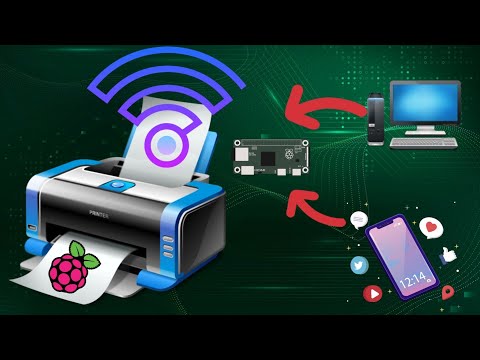
This video tutorial demonstrates how to easily add wireless print capablity to your wired legacy printers using your Raspberry Pi. We hav...


How to add Wireless capability to legacy printers using Raspberry Pi
This video tutorial demonstrates how to easily add wireless print capablity to your wired legacy printers using your Raspberry Pi. We hav...